

Technical articles
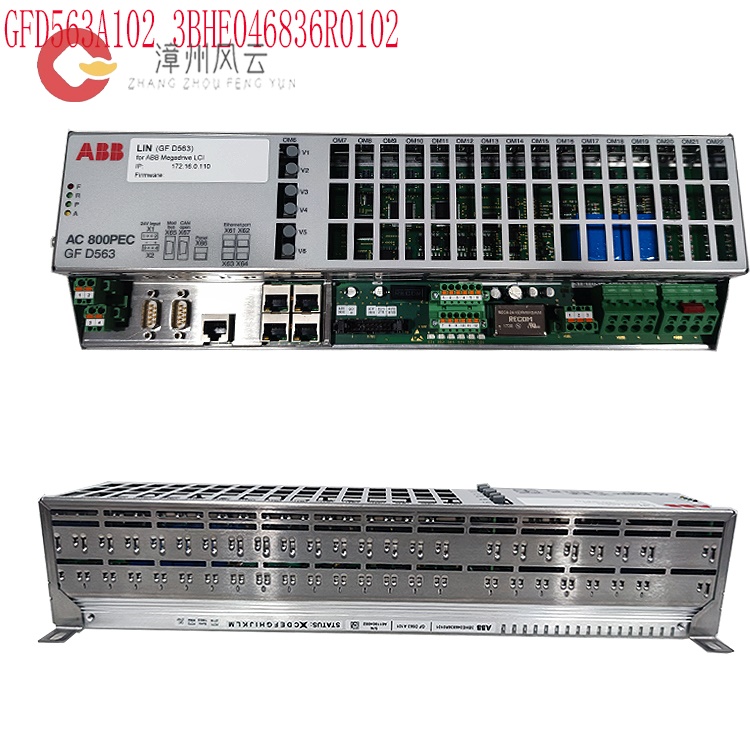
How to perform routine maintenance on the 3BHE046836R0102 GFD563A102 excitation controller? What precautions should be taken if replacement is necessary? Does the data software need to be backed up and migrated?
Date: Nov 15, 2025 Views: 8600
3BHE046836R0102 GFD563A102 Excitation Controller Daily Maintenance, Replacement, and Data Management Guide
I. Key Points of Daily Maintenance
Regular Inspection and Monitoring
Hardware Status: Regularly check the workload (e.g., CPU/memory usage) of the controller, computer, and I/O modules to ensure no abnormal increases; check the cooling system (fans, air ducts) for unobstructed flow to prevent overheating and malfunctions.
Electrical Connections: Check the power system (redundant power switching, UPS battery status), network connectors (e.g., Ethernet/Profibus), and grounding resistance (must comply with IEC standards) to ensure secure connections and no corrosion.
Signal and Interference Protection: Check the integrity of signal cable shielding to avoid electromagnetic interference; regularly calibrate critical signals (e.g., PT/CT inputs) to ensure accuracy.
Software and Configuration Management
System Updates: Regularly update firmware/software versions and fix known vulnerabilities; use ABB official tools (e.g., Control Builder) for configuration backup (e.g., XML/CFG files), and it is recommended to archive monthly or on a project cycle.
Diagnostics and Logging: Monitor system logs (e.g., fault codes, alarm messages), analyze potential problems using ABB diagnostic tools; regularly clean up temporary files to free up storage space.
Preventative Maintenance
Cleaning and Protection: Regularly clean the inside of the control cabinet to prevent dust accumulation; perform waterproof/dustproof treatment on outdoor equipment (e.g., IP54 or higher protection rating).
Functional Testing and Calibration
Perform a full system functional test every six months, including excitation regulation, reactive power distribution, and dynamic response. Use dedicated software (e.g., ABB UNITROL configuration tool) to check parameter settings to ensure they match the generator.
Calibrate key parameters (e.g., overcurrent and overvoltage protection thresholds) to ensure they conform to equipment specifications.
.jpg)
Redundancy Testing: Regularly test the switching function of redundant modules (e.g., power supply, communication modules) to ensure seamless switching in case of failure.
II. Replacement Precautions
Compatibility and Installation
Model Matching: Before replacement, confirm that the new module model (e.g., 3BHE046836R0102) is fully compatible with the original system, including hardware interfaces (e.g., PCIe/VME bus), software protocols (e.g., IEC 61850), and electrical parameters (voltage/current rating).
Installation Steps: Follow the ABB installation manual. First, disconnect the power and wear an anti-static wrist strap. After inserting the module, verify that the connector is making full contact to avoid loose connections. After restarting the system, check the self-test log to confirm successful module recognition.
Preparation Before Replacement
Power-Off Operation: Before replacement, the power must be completely disconnected, and verify that there is no residual voltage. Use anti-static tools (e.g., anti-static wrist strap, anti-static bag) to avoid electrostatic damage to the module.
Compatibility Confirmation: The new module must be compatible with the original system, including firmware version, interface protocol (e.g., Profibus, Modbus), and physical dimensions. It is recommended to use ABB original or certified compatible modules.
Replacement Procedure
Removing the Old Module:Loosen the fixing screws and gently pull out the module, avoiding forceful pulling which could damage the interface. Record the old module's serial number, configuration parameters, and historical fault information.
Installing the New Module: Align the module with the slot and gently push it to the bottom, ensuring full contact. When connecting cables, follow the "signal first, power last" principle to avoid short circuits.
Configuration Restoration: Restore parameters using backup data or reconfigure using dedicated software. Perform a no-load test to verify the excitation current, voltage stability, and protection functions (such as overcurrent and overvoltage triggering).
Safety and Verification:
After replacement, a full-load test is required, running continuously for at least 24 hours, monitoring temperature, vibration, and electrical parameters. Record the test data and compare it with historical data to ensure performance consistency.
.jpg)
Configuration Migration and Testing:
Parameter Migration:Use ABB configuration tools (such as Configuration Studio) to export the original module parameters (such as PID settings and protection thresholds), import them into the new module, and verify parameter consistency.
Functional Testing: Conduct no-load/load tests to verify the normal operation of excitation regulation (e.g., voltage stability, reactive power control), protection functions (e.g., overcurrent/undervoltage protection), and communication interfaces (e.g., Modbus TCP); simulate fault scenarios (e.g., power grid fluctuations) to test dynamic response capabilities.
Safety and Compliance
Safety Standards: Strictly adhere to electrical safety regulations during replacement (e.g., power-off operation, lock management); isolate and protect high-voltage/high-current areas.
Document Records: Record replacement time, operators, test results, and subsequent observation period (e.g., 72-hour operation monitoring) in detail to create a maintenance file.
III. Data and Software Backup and Migration
Backup Strategy
Configuration Files: Regularly back up controller configurations (e.g., XML files), parameter configurations (e.g., PID parameters), and system logs, storing them on secure media (e.g., encrypted hard drives, cloud storage). It is recommended to use the "3-2-1" principle (3 backups, 2 media, 1 off-site copy).
Software Version: Back up the current system software version and patch information to ensure a consistent software environment after migration.
Migration Process
Data Migration: Use ABB's proprietary tools (such as System Manager) to migrate configurations, ensuring new devices inherit original parameters; export/import databases (such as historical data and alarm records) to verify data integrity.
Verification and Rollback: Perform functional verification after migration. If anomalies are found, quickly roll back to the backup version; manually verify critical data (such as protection settings) to avoid migration errors.
Long-Term Management
Version Control: Establish a software/configuration version repository, recording the content and reason for each change, supporting historical traceability.
Disaster Recovery Plan: Develop a data disaster recovery plan (such as off-site backup and regular recovery drills) to ensure data recovery in extreme circumstances.
Key Precautions
Anti-static Measures: All operations require wearing anti-static wrist straps and using anti-static workbenches and tools.
Compatibility Verification: Before replacing modules, confirm that the firmware version, interface protocol, and physical dimensions match the original system.
Documentation Records: Record the maintenance, replacement, and backup operations in detail, including time, personnel, equipment status, and test results, forming a complete maintenance archive.
In summary, through systematic daily maintenance, rigorous replacement procedures, and standardized data management, the efficient and stable operation of the 3BHE046836R0102 GFD563A102 excitation controller can be ensured, extending equipment life and reducing the risk of failure.
Related product recommendations:
PPD113B03-26-100110 3BHE023584R2634
PPD115A102 3BHE017628R0102
3BHE030410R3011 PPD117A3011
3BHE020455R0103 PPD103B103
3BHE040375R103E PPD512A10
3BHE040375R1023 PPD512A10
3BHE039724R0C3D PPD513AOC
8R37-2021-21-3101 PCD2000
3BHE022291R0101 PCD230A
3BHE057901R0101 PCD235C101
3BHE028915R0101 PCD237A101
3BHE046836R0102 GFD563A102
3BHE046836R0101 GFD563A101
3BHE041343R0102 PCD530A102
PPD113-B03-23-111615 3BHE023584R2365
PPD113B01 3BHE023784R1023
3BHE017628R0102 PPD115
More......
RELATED ARTICLE
Address
Room 205, Office Building, No.1 Chaoyang North Road, Longwen District, Zhangzhou City, Fujian Province
fengyunfadacai@qq.com
Sales consultant
Miss.Green
+86 15860249102